

Loyalty & Payments for Merchants
Download App1. Click to download “LocalPay: Loyalty and Payments”
2. Securely log in to your online banking and register
3. Generate a QR code to receive payments from any consumer
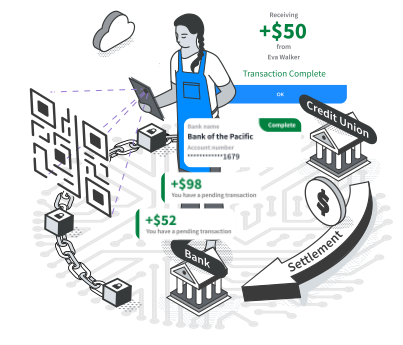
What LocalPay Does
LocalPay lets customers pay retail merchants directly from their bank account. Merchants get faster settlement and avoid high credit and debit card fees, while customers get instant discounts and loyalty rewards from card fee savings.
Benefits to Merchant Users
- Merchant fees as low as 0.5% or a low monthly fee
- Make local offerings/ads in the LocalPay app and bank apps to drive traffic to your business
- Real-time settlement when same bank as consumer
- Same-day or next-day settlement when different banks
- Use existing POS, enter payments as cash transactions
How It Works
LocalPay partners with banks and merchants to enable account-to-account payments between merchants and consumers, generating significant savings from card fees and passing those savings on to merchants and consumers.
How to Install
Merchant Signup
Register in less than 2 minutes
Merchant FAQs
How do I sign up?
Register your business in under two minutes by providing your business name, basic organizational details (EIN, ZIP Code, and business type), phone number, and linking your settlement bank account.
What savings in merchant fees does my business get with LocalPay?
Your processing fees are determined directly by your acquiring bank. Typically, partner banks structure LocalPay fees in one of two user-friendly ways:
- A competitive 0.5% to 1.5% per transaction fee.
- A flat monthly subscription fee for unlimited transactions.
- Contact your bank directly for your specific rate sheet.
What features are available with a merchant account?
LocalPay provides a robust suite of merchant tools designed to drive revenue and optimize operations:
- Targeted Promotions: Advertise directly to nearby consumers (available as an add-on subscription).
- Real-Time Balance Checks: Instantly verify if a customer has sufficient funds before processing a transaction ($0.10 per query).
- Employee Management: Create subordinate staff accounts that route sales directly into your primary merchant account.
- Customized Incentives: Easily configure percentage-based or flat dollar-amount discounts.
- Point-of-Sale Flexibility: Toggle options for tipping, tax calculations, auto-confirmations, and digital receipts.
Do you have resources to help me onboard my customers?
Yes. LocalPay provides complimentary marketing collateral and consumer sign-up instructions. You can request these marketing kits directly from your partner bank or by emailing contact@localpay.com.
How do I run advertisements and promotions?
Marketing features are managed on the Promotions page at the bottom of your navigation menu. Once you subscribe to the add-on feature, launching a campaign takes four simple steps:
- Initiate Campaign: Click Create a new promotion within your merchant dashboard.
- Configure Terms: Enter your campaign parameters: Start Date, End Date, Discount Amount, and a compelling customer description.
- Authorize and Launch: Click Save to lock in your settings.
- Go Live: Your promotion will automatically launch at 12:01 AM on your selected Start Date.
Can I run multiple promotions at once?
To maintain high user engagement and clean app interfaces, LocalPay currently limits merchants to one active promotion at a time. However, campaigns are highly customizable; you can modify, extend, or terminate your active promotion instantly at any time.
Where do my promotions appear?
Your promotions are pushed directly to LocalPay consumer apps and integrated partner banking apps within your geographical area. You can also select Push my promotion to local Consumers to broadcast a direct push notification to nearby users (allotment varies by subscription tier).
How does the Check Balance feature work?
This tool verifies in real time whether a consumer has sufficient funds in their linked account to clear the current transaction.
- Cost: $0.10 per check.
- Usage: Optional for standard everyday transactions; automated configurations can be set up for high-ticket sales (e.g., transactions over $50).
- Note: Balance validation occurs at the exact second of the transaction. Because clearing depends on network settlement schedules, a consumer's balance could theoretically change between the point of sale and final settlement.
Have questions or need extra help? Email us at support@localpay.com